 With 40 years of Windows under my belt I have found and used numerous utilities for screen capture and annotation, deep dives to find files with combinations of attributes, file syncing and on and on. There is a free suite by Nirsoft that is truly mind boggling with its breadth of useful tools with many found nowhere else. Their “file search” utility called SearchMyFiles is exceptional though a bit complex.
Too often there is little equivalency for utilities in Mac. And Mac utilities can be surprisingly pricey! My favorite example is that the top rated Cleanshot X screen capture pales to the long ago abandoned FastStone Capture in Windows. And I have tried virtually every Mac screen capture in depth. I bought Cleanshot as best of breed and at a price I feel is above its value. I long for a replacement with better annotation.
Find Any File
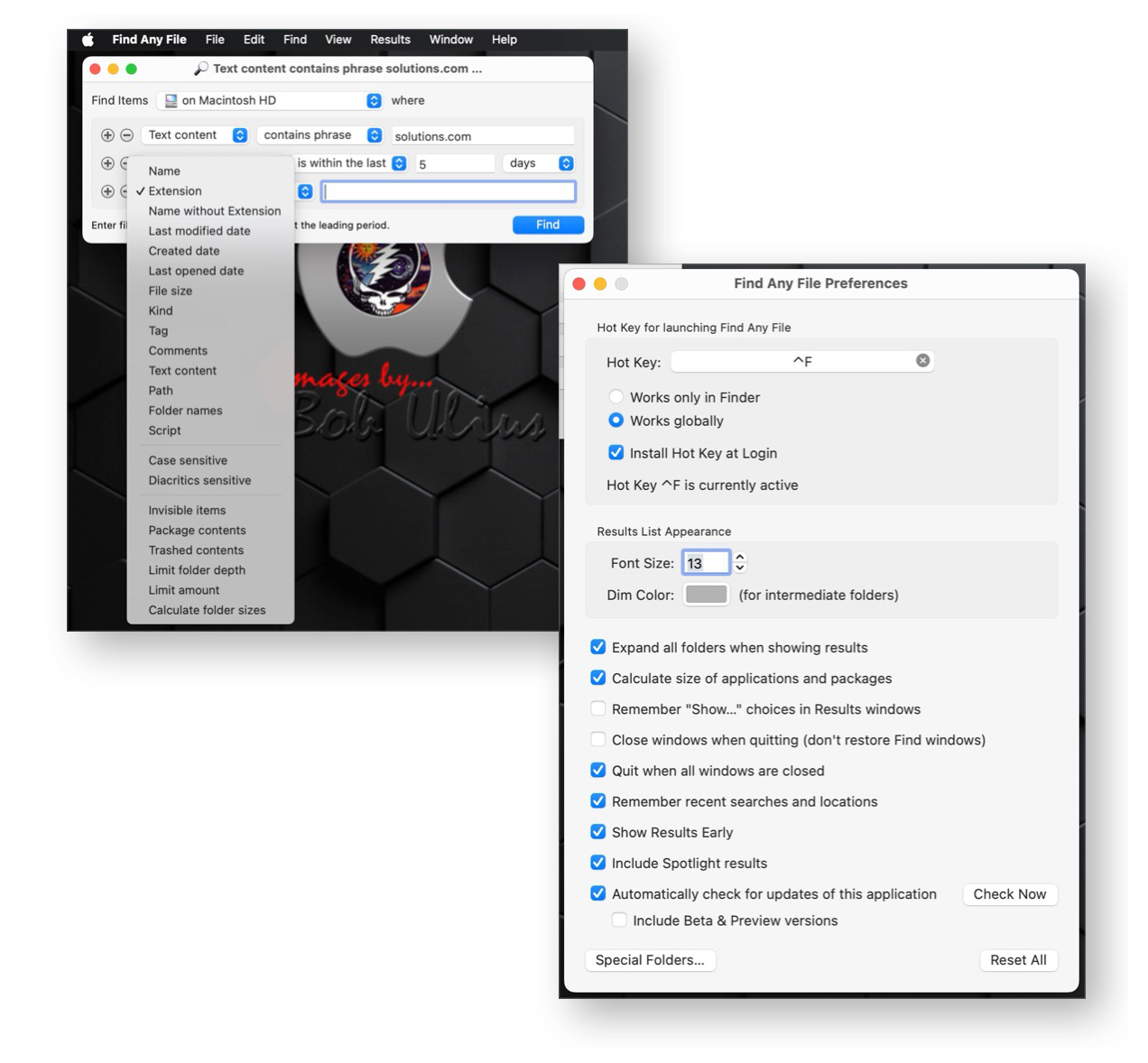
One exception on Mac is “Find Any File “ which allows much deeper dives thanSpotlight and I find very useful when, for example , looking for a file I know I created with a specific string in the body. I have many other use cases. Its the rare exception for me that I prefer a Mac version utility as being less complex and more productive. But FAF is that. And not only reasonable priced, but is authored by a developer that is very responsive to fixing issues and bugs.
Find Any File – https://findanyfile.app/ – allows great flexibility to search your local and network discs. As the description on the app’s page says:
- FAF can find files that Spotlight doesn’t, e.g. on network (NAS) and other external volumes, hidden ones inside bundles and packages, and those in folders that are usually excluded from Spotlight search, such as the System and Library folders. It can even search in other users’ folders if you use FAF’s unique root search mode.
- FAF lets you search precisely for many file properties such as name, extension, date range, size, kind etc.
Find Any File isn’t meant to replace Spotlight, but it complements it greatly:
 If you search for files by name, size, dates, kind and other directory properties,use FAF, because only then you can be sure that everything available is found, even if Spotlight hasn’t indexed it.
- FAF can also find textual content in plain text, in zip (including Word and Excel files) and even in most binary files. And with the option to include Spotlight results, it can also find text in PDF documents as long as they were indexed by Spotlight.
The app page lists more features and even suggests better alternatives for specific searches. Worth a look if this genre of utility is a need or interest. And FAF is shareware. Download a full working app, try it and if you keep it buy it on the honor system. Hard to beat.

 Many messages with empty promises and nothing ever done to even TRY to correct this. So if support for you purchases is high on your checklist, ASUS gets an extremely low rating from me. If there was another reasonably priced alternate with equal performance, I would have returned this. As it stands, I live with the limitation.